

Pick Circle if you’re running a structured membership, cohort course, or coaching program that needs automation and integrations. Pick Mighty Networks if member discovery and mobile-first social interaction drive your engagement. Neither handles integrated payments and AI-optimized funnels the way a dedicated commerce platform does, which is why creators layering monetization on top of either one increasingly look at Commas as the connecting piece.
TL;DR:
The pricing model of your platform matters more than fees, with tiered subscriptions often becoming significantly more expensive at higher member levels.
Choice of interface impacts content longevity and member engagement, with workspace layouts better for evergreen content and feed formats ideal for active social interaction.
Features like scheduling for cohorts or quizzes for courses depend on your business focus, requiring careful mapping before platform comparison.
Mobile experience is critical for retention, especially for platforms supporting constant check-ins, with native apps offering better engagement at higher costs.
Integrating payments, funnels, and affiliate tracking into one system like Commas reduces friction, increases conversions, and minimizes the hidden costs of stitching multiple tools together.
Table of Contents
-
Circle vs Mighty Networks: Pricing and Fees That Actually Move Revenue
-
Course Features: What Actually Matters for Cohorts vs Evergreen Content
-
Integrations and Automation: How Much Manual Work Are You Signing Up For?
-
Customization and White-Labeling: What You Own vs What You Rent
-
Monetization Features: Checkout, Coupons, and Affiliate Support
Circle vs Mighty Networks: Pricing and Fees That Actually Move Revenue
The sticker price on a pricing page tells you almost nothing about what a community platform will cost you at scale. What matters is the shape of the fee model: does it charge a flat subscription, or does it take a cut of every transaction? That single distinction can swing your annual take-home by thousands of dollars once you cross a few hundred paying members.
Workspace-style platforms like Circle tend to favor tiered monthly subscriptions with transaction fees that shrink (or disappear) as you move up plans. Social-network-style platforms like Mighty Networks have historically mixed subscription tiers with their own transaction cuts on top of whatever your payment processor already takes. Layer a standard Stripe fee (typically 2.9% plus $0.30 per transaction in the US) on top of a platform’s own commission, and a $47 course sale starts losing real money before you ever touch it.
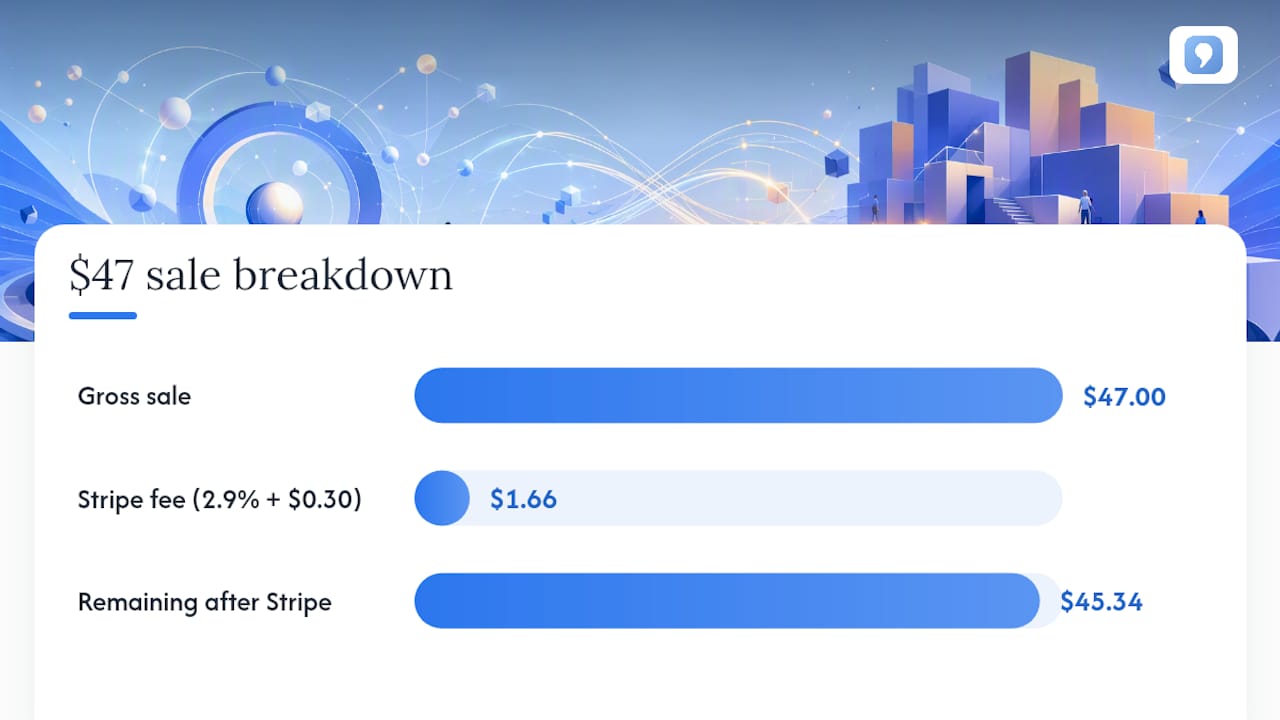
Here’s where creators get burned: the pricing cliff. You sign up on a starter plan that looks affordable, hit a member cap or feature wall, and get pushed into a tier that costs three or four times more. Category-level pricing comparisons show this pattern is common across both platforms: white-label apps, advanced automation, and API access routinely sit behind the most expensive plans, not the mid-tier ones creators actually buy.
Pro Tip: Before you commit to a plan, calculate your break-even membership count at the NEXT tier up, not just your current one. If 40 new members would force an upgrade, model what that upgrade costs against the revenue those 40 members generate.
A few numbers worth running before you sign anything:
-
Your current monthly subscription cost divided by your current member count (cost per member)
-
Processor fees plus platform transaction fees as a percentage of your average sale price
-
The membership count where the next-tier subscription becomes cheaper than transaction fees on your current plan
-
Annual cost difference between month-to-month billing and an annual contract, since most platforms discount 15% to 20% for prepay
If you’re running more than a few hundred paying members or multiple cohorts, it’s worth a direct call to sales about enterprise terms. Both platforms negotiate once you’re a meaningful account, and the published pricing pages rarely reflect what a mid-size creator business actually pays after that conversation.
The deeper problem isn’t the platform fee at all. It’s that neither Circle nor Mighty Networks was built to also process your checkout, run your upsell sequence, and manage your affiliate payouts. You’re paying platform fees for the community, then bolting on separate tools (and separate fees) for payments and funnels. That’s the fragmentation cost most pricing comparisons never mention.

Circle vs Mighty Networks: Interface and Daily Workflow
Open Circle for the first time and you land in something that feels like a workspace: spaces, threaded discussions, member directories organized by topic. Open Mighty Networks and you land in something closer to a social feed: activity streams, member profiles front and center, content organized by recency and interaction.
That difference isn’t cosmetic. It changes how your content ages and how your members find things.
Circle’s space-based structure keeps content organized by topic indefinitely. A member who joins six months after you posted a detailed onboarding guide can find it exactly where you left it, because spaces don’t scroll away the way feeds do. This matters enormously for evergreen course content, resource libraries, and anything you want members to reference repeatedly rather than consume once and forget.
Mighty Networks leans into the opposite strength: social-network-style platforms prioritize discovery and richer member profiles, which tends to increase daily active use for consumer-facing communities. If your members’ primary value is interacting with each other, not referencing structured content, a feed-first design surfaces new activity in a way a space-based tool doesn’t naturally do.
Moderation follows the same split. Threaded, space-organized platforms make it easier to assign moderators per topic and enforce rules per space. Feed-based platforms make broad moderation faster (one stream to watch) but topic-specific moderation harder, since conversations blend together.
Three quick tests to run during any trial account, before you migrate a single member:
-
Post a piece of long-form content, then try to find it again after adding ten more posts. Note how many clicks it takes.
-
Create two different member roles and see how granular your moderation permissions actually are.
-
Search your own community for a keyword you know exists in an old post. Time how long it takes.
Pro Tip: Invite two or three real (not test) members into your trial and watch where they get confused. You’ll learn more from five minutes of watching a live member navigate than an hour of clicking around yourself.
Neither interface is objectively better. A cohort-based coaching program with structured modules almost always performs better in a workspace layout. A hobbyist or lifestyle community where members mostly want to talk to each other tends to thrive in a feed. The mistake is picking based on which one looks nicer in a demo video rather than which one matches how your specific members actually use the space day to day.
Course Features: What Actually Matters for Cohorts vs Evergreen Content
Not every “course builder” is built for the same job, and this is where a lot of creators pick the wrong platform for the wrong reason. A drip-fed cohort program with live calls and deadlines needs fundamentally different tools than a self-paced evergreen course someone buys and works through at their own pace.
For cohort-based programs, the features that matter are scheduling and pacing controls: content that unlocks on a calendar rather than a purchase date, group deadlines, and space for live session recordings tied to specific weeks. A platform that only supports simple drip-by-day-since-purchase logic will frustrate you the moment you run a live cohort with a fixed start date.
For evergreen, self-paced courses, the priorities flip. You care more about completion tracking, quizzes that gate progress, and certificates members can show off (which double as free marketing when shared on LinkedIn). If credentialing matters to your niche, professional certifications, continuing education credits, confirm the platform can issue a certificate that looks legitimate, not a generic “completion” badge.
Map your business model to the feature set before you compare pricing:
-
Cohort programs with live components: calendar-based unlocking, live session hosting or embedding, group progress visibility
-
Evergreen self-paced courses: quiz gating, automated certificates, completion percentage tracking per member
-
Hybrid or coaching-plus-community models: the ability to run both a structured course and an open discussion space under one login
-
Membership-first communities with light course content: simpler drip modules matter more than deep LMS features
Review-aggregate data consistently shows creators rating course authoring, quiz depth, and certificate quality as one of the biggest differentiators between platform families, more than most buyers expect going in. If you’re selling anything positioned as professional development or coaching, treat this as a dealbreaker category, not a nice-to-have.
Before you commit, build one real module in the trial account, not a placeholder. Add a quiz with a passing threshold, issue yourself a test certificate, and check whether the drip schedule actually respects a cohort start date rather than just days-since-signup. If a platform’s course builder makes you fight the interface to do something as basic as gating content by calendar date, that friction multiplies across every cohort you run for years. For programs that lean heavily on live coaching sessions rather than packaged video content, it’s also worth comparing against a platform built specifically to sell coaching online, since general community platforms sometimes treat live coaching as an afterthought.
Mobile Experience: When a Native App Actually Matters
Mobile traffic keeps climbing as a share of total web activity worldwide, and that shift shows up directly in how creator communities get used day to day. If your members check in throughout the day rather than sitting down at a desktop once a week, mobile quality isn’t a secondary feature. It’s the primary interface.
Push notifications are the clearest example. A member who gets a push alert when someone replies to their post comes back within minutes. A member who has to remember to check a browser tab comes back when they remember, which for most people means never. Mobile traffic trends suggest this gap only widens as more of your audience’s daily internet time shifts to phones rather than laptops.

Social-network-style platforms have generally built their entire product around this reality: native apps, richer push notification logic, profile-driven discovery designed for thumb scrolling. Workspace-style platforms have historically treated mobile as a companion experience to a desktop-first product, though that gap has been narrowing as feature-release cadence accelerates across the category.
The tradeoff isn’t just about which app feels nicer. Branded, white-label mobile apps, the kind that show up in the App Store under your own name rather than a generic community app umbrella, typically require a higher-priced tier and add real time to launch, since app store review adds weeks to your timeline. A mobile web experience gets you live today. A branded native app gets you better retention and discoverability, months from now, at a real cost.
Run these checks before choosing based on mobile alone:
-
Test push notification delivery speed yourself: post something, then time how long the notification takes to arrive on your phone.
-
Check whether admin and moderation tools are fully functional on mobile, or whether you’ll need a laptop to do anything beyond browsing.
-
Ask directly whether in-app purchases route through the platform’s payment system or the app store’s, since Apple and Google both take a cut that can eat into your margin on mobile-originated sales.
If your community’s core value is people checking in constantly throughout the day, weight mobile heavily even if it means accepting a steeper learning curve elsewhere. If your members mostly engage during scheduled live sessions or weekly content drops, mobile quality matters far less than course structure and automation.
Integrations and Automation: How Much Manual Work Are You Signing Up For?
Every hour you spend manually adding members to a course after a purchase, manually tagging cohort groups, or manually exporting email lists to your marketing tool is an hour you’re not spending on content or sales. Automation depth is one of the most underrated factors in a platform decision, and it’s exactly where 2026 comparisons show the sharpest divergence between the two architectures.
Workspace-style platforms have leaned hard into API-first design, webhooks, and native Zapier support, largely because their buyer base skews toward creators running structured, SaaS-like operations with multiple connected tools. That shows up in practical automations: a purchase in your checkout automatically triggers course access, a new member signup automatically tags them in your CRM, a cohort’s start date automatically triggers a welcome sequence.
Social-network-style platforms have generally prioritized their own native features (feed algorithms, discovery, mobile) over deep third-party automation, which means creators on those platforms more often rely on manual workarounds or third-party middleware to connect their stack.
The integrations that actually save time, in rough order of impact:
-
Payment processor connections that trigger access automatically, no manual approval step
-
Email or CRM sync so new members land in your marketing sequences without a CSV export
-
Zapier or native webhook support for anything not natively integrated
-
Analytics connections (something like Microsoft Clarity paired with your platform gives you real behavioral data on how members actually navigate, not just vanity metrics)
Pro Tip: Ask a sales rep to show you the Zapier or webhook integration live during a demo, not just confirm it exists. “We support Zapier” can mean anything from five triggers to fifty.
The catch, and this is where a lot of creators get surprised after signing an annual contract: advanced integrations and API access are frequently gated behind the highest-priced tiers on both platform families. Confirm exactly which tier unlocks the automation you actually need before comparing sticker prices, because the plan that looks cheapest on the pricing page is often missing the one integration that would save you ten hours a month.
Customization and White-Labeling: What You Own vs What You Rent
“White-label” gets thrown around loosely in this category, and the definition matters more than most comparison articles admit. True white-labeling means your own domain, your own branded mobile app in the app stores, and zero visible mention of the underlying platform anywhere a member sees. Partial branding, custom colors and a logo on an otherwise platform-branded interface, is a different and much cheaper thing entirely.
Heavier customization tends to correlate with better conversion, since a fully branded experience feels like your product rather than a rented space inside someone else’s platform. But that customization comes with a real cost: the deeper you customize (custom CSS, fully white-labeled apps, custom domains with SSL), the harder it becomes to migrate later if the platform changes its pricing or you outgrow it.
Before you invest serious time building custom themes or requesting a white-label app, run this checklist:
-
Can you export your full member list, including email addresses and purchase history, in a standard format like CSV?
-
Can you export your actual content (posts, course videos, discussion threads), or only metadata about it?
-
Does cancel your account preserve your custom domain and branded app, or do you lose them immediately?
-
Is your member data portable to another platform’s schema, or will you need to manually rebuild every membership tier and access rule?
The largest operational risk in any migration isn’t losing your content. It’s losing the payment relationships tied to in-app purchases and the membership IDs that your automations reference. Test a full export and reimport in a dry run before you build anything you’d hate to lose.
Monetization Features: Checkout, Coupons, and Affiliate Support
This is the category where the architecture debate stops mattering and the commerce debate takes over, because neither Circle nor Mighty Networks was designed primarily as a payments company. Both offer membership tiers and some checkout functionality. Neither was built from the ground up to optimize a sales funnel.
Native checkout, where a member pays without leaving the platform or getting bounced to an external processor page, converts meaningfully better than a stitched-together flow. Every redirect between “click buy” and “payment confirmed” is a chance for a customer to abandon. Publishers report better lifetime value when checkout and funnel tools are native rather than assembled from separate apps, and that gap compounds over the life of a membership business, not just a single sale.
Transaction fees stack in ways that aren’t always obvious upfront. Coupon and discount code functionality varies widely in flexibility too. Some platforms only support percentage-off codes; others support tiered discounts, limited-use codes, and affiliate-specific pricing.
Affiliate support is the feature most creators underestimate until they need it. A built-in affiliate system that automatically tracks referrals and handles payouts, rather than a manual spreadsheet and PayPal process, raises lifetime value by turning your existing members into a sales channel with almost no added overhead. Look for:
-
Native checkout with no external redirect
-
Flexible coupon and discount logic, not just flat percentage codes
-
Automated affiliate tracking and payout, not manual attribution
-
Support for subscriptions, one-time purchases, and installment or buy-now-pay-later options in a single system
If commerce depth is your top priority, and for most creators monetizing a community it should be, this is exactly the gap a dedicated platform like Commas is built to close, with affiliate systems and payment handling native to the same account as your community and courses.
How to Choose: The Ten Questions to Ask Before You Sign
Skip the feature checklists and ask these ten questions directly on your next trial call or demo. The answers reveal more than any comparison chart.
-
What happens to my pricing and my transaction fees when I cross your next member threshold?
-
What specific integrations and API endpoints are available on my exact plan, not your top-tier plan?
-
Can I export all member data, content, and purchase history in a standard, non-proprietary format?
-
What does a branded mobile app cost, and how long does app store approval typically take?
-
What’s your actual support response time (SLA), not your marketed “24/7 support” claim?
-
What’s your platform’s uptime history over the last twelve months, and can you show it?
-
What customization am I locked out of on my current tier that competitors include by default?
-
What’s the real cost, in dollars and setup time, to onboard my existing member list?
-
If I need to migrate away later, what do you help with, and what am I on my own for?
-
Who owns the payment relationship, your platform, your payment processor, or me, if there’s a billing dispute?
Red flags during a trial: sales reps who dodge the export question, demo environments that hide the actual pricing tiers, and any “unlimited” claim that turns out to have an asterisk once you ask about API calls or storage.
Pro Tip: Write down your top three non-negotiable requirements before your first demo call, not after. It’s far too easy to get impressed by a flashy feature you’ll never use while the platform quietly can’t do the one thing your business actually needs.
Industry recommendations converge on one rule: match the platform architecture to your dominant business model first, cohort education versus ongoing membership versus mixed commerce, then evaluate pricing and features within that lane. Choosing based on architecture fit before comparing line-item features saves most of the regret creators report after migrating.
Why Integrated Monetization Changes the Math
Circle and Mighty Networks both answer the same underlying question well: where do my members gather, and how is content organized once they’re there? Neither one was built to answer a second, equally important question: how does money move through this business with the least friction possible?
That’s the gap Commas is built to close. Instead of a community platform, a separate checkout tool, a separate funnel builder, and a separate affiliate tracker all stitched together with Zapier and hope, Commas puts payments, sales funnels, courses, and community management into one account.
-
Integrated payments, including one-click checkout, buy-now-pay-later, and subscriptions, means no redirect-related drop-off between “interested” and “paid.”
-
AI-optimized funnels through Vibe Funnels adjust based on patterns that already convert, so you’re not manually A/B testing every page for months.
-
Native affiliate systems turn existing members and customers into a sales channel without a separate tracking tool.
-
Studios combine courses and community in the same product, so creators running a hybrid model aren’t paying for two platforms to do one job.
Creators consistently report that the biggest hidden cost of running a community isn’t the platform subscription. It’s the accumulated friction and fees of stitching together five separate tools to get paid, deliver content, and track referrals, each with its own login, its own fee, and its own point of failure.
The practical outcome, when your monetization tools live in the same account as your content, is fewer places for a paying customer to abandon the process, faster checkout, and conversion improvements that come from a system actually optimizing the funnel rather than a static page you built once and forgot about.
What Creators Wish They Knew Before Committing
The most common regret we hear isn’t about features at all. It’s about pricing surprises. Creators sign up on a plan that fits their current member count, grow past it faster than expected, and get hit with an upgrade bill that wasn’t in the budget. Model your break-even at the next tier up before you sign, not after you’re already trapped in an annual contract.
The second regret is migration difficulty. Members don’t just have profiles, they have purchase history, course progress, and payment methods on file. Moving all of that to a new platform is never as simple as a CSV export, and creators who skip a real migration test often lose paying members in the transition, not because the new platform is worse, but because the move itself was clumsy.
The third, quieter regret is discovering too late that the API access or automation you assumed was standard was actually locked behind a plan you didn’t buy.
Before you migrate anything, run three small experiments: move a pilot group of ten to twenty members first and watch what breaks. Do a full data export and reimport as a dry run, even if you’re not migrating yet, just to know it’s possible. And ask your current members directly what they’d miss if you changed platforms tomorrow. Their answer often reveals which features actually matter, versus which ones just looked good in a sales demo.
— FanBasis
Ready to Simplify How You Get Paid?
Circle and Mighty Networks both solve where your community lives. Neither solves how money actually moves through your business, which is the part that determines whether your community turns into real, compounding revenue or just a nice place people hang out for free.
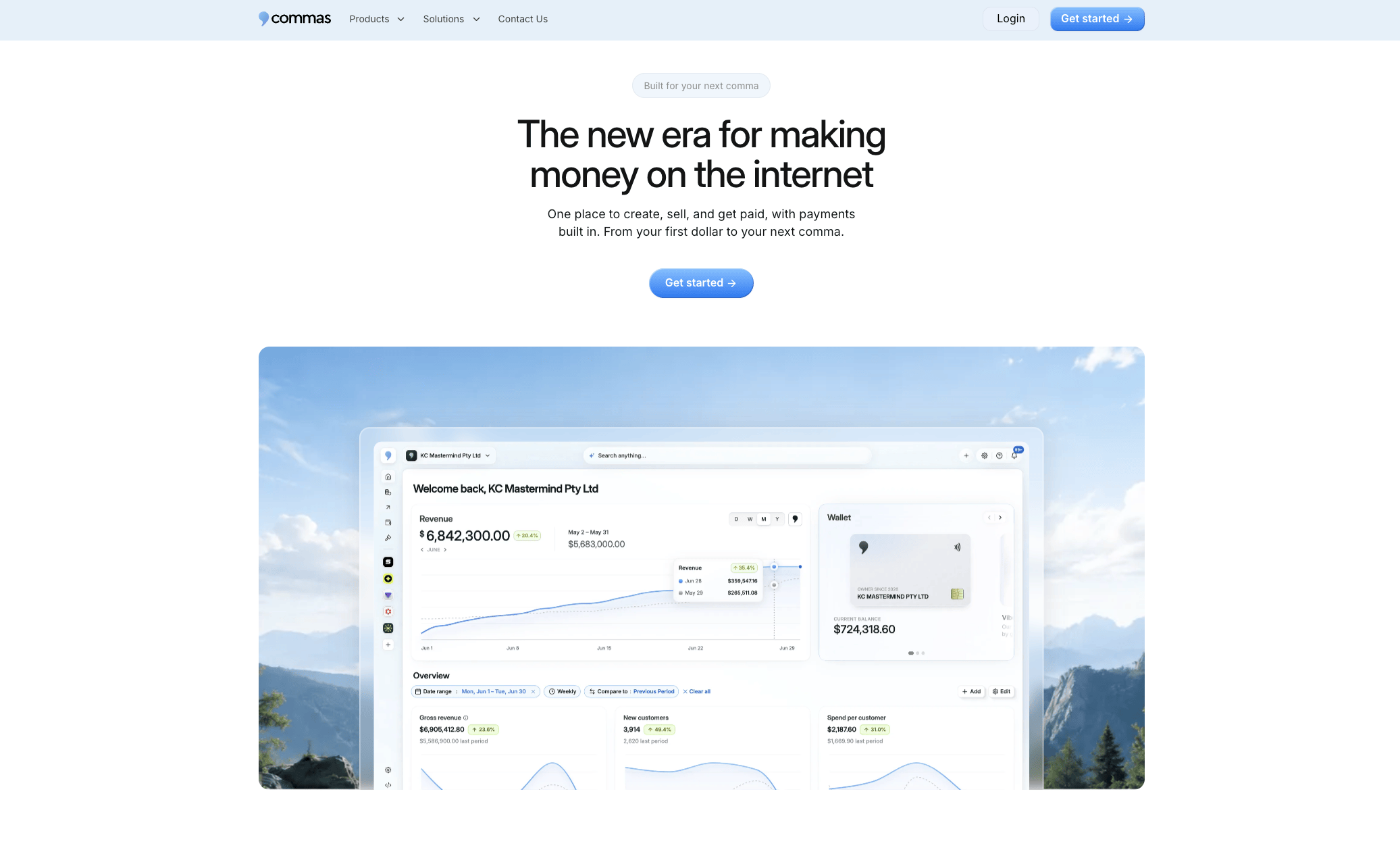
Commas puts your payments, courses, community, and affiliate program in one dashboard instead of five separate logins with five separate fee structures. If you’re running a coaching program, a paid membership, or a course business and you’re tired of watching revenue leak out through disconnected checkout flows, that’s specifically the gap Commas closes with AI-optimized funnels and native affiliate tracking built in from day one. Creators running paid memberships can see the full setup on the paid communities and groups page, and hybrid course-plus-community businesses will want to look at Studios specifically. Start a free trial today and run your own migration test before you decide anything permanent.